RFP Compliance Matrix: What It Is, How to Build One, and What Goes in Each Column
· Compliance matrix, RFP response, Proposal writing
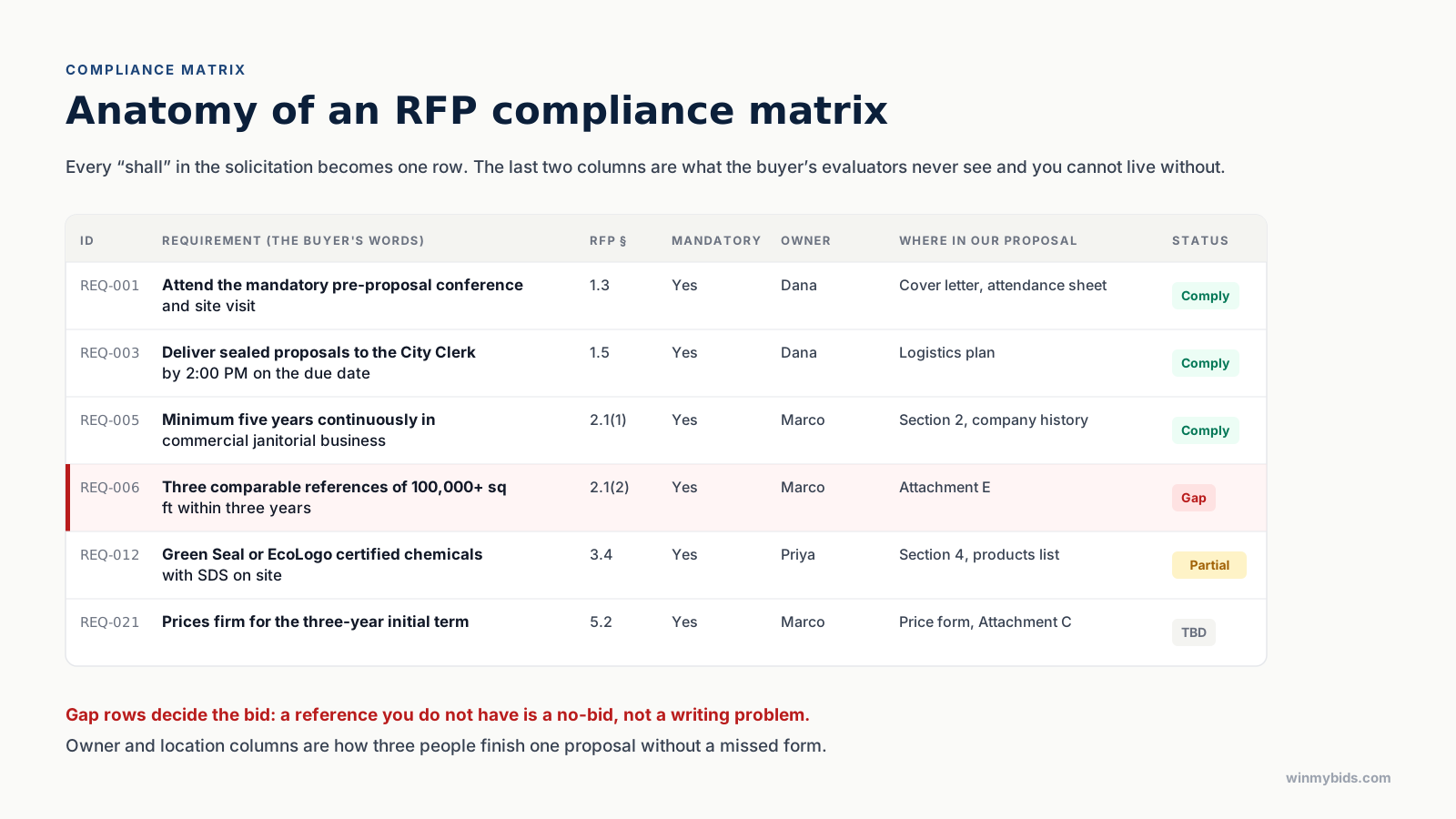
Key takeaways. One row per requirement, in the buyer's words, with its section reference. Mark what is mandatory. Add owner, response location, and status columns for your own team. Build it before writing; use it to check after. Export it, because evaluators score against a checklist and yours should match theirs.
Evaluators do not read proposals the way you write them. They read them with a scoring sheet on one side and the solicitation's requirements on the other, looking for whether each requirement was answered, where, and how well. A compliance matrix is that same sheet, built from your side of the table, before you write.
For a small contractor without a proposal department, it is also the difference between a bid that is complete and one that is missing the notarized affidavit on page 41.
What a compliance matrix is
A table with one row for every requirement in the solicitation. Not a summary of the requirements; every one, in the buyer's own words, with the section it came from. Every "shall," "must," and "will." Every form the buyer expects back. Every attachment, every signature, every copy count, every page limit.
The matrix has two audiences. The evaluators, who may receive a version of it as a cross-reference in your proposal, and your own team, who use it to divide the work and check it.
The seven columns
| Column | What it holds | Why it matters |
|---|---|---|
| ID | A stable label such as REQ-014 | So three people can talk about the same row |
| Requirement | The buyer's exact words, not a paraphrase | Paraphrases drop qualifiers; "within three years" matters |
| RFP section | 2.1(2), Attachment C, Addendum 1 | So anyone can check the source in seconds |
| Mandatory | Yes or no, and whether a miss means rejection | The rejection-grade rows decide the bid |
| Owner | Who on your team answers it | The column that stops "I thought you had it" |
| Response location | Section 4.2, Attachment E, cover letter | What the evaluator's cross-reference will show |
| Status | Comply, partial, gap, N/A, to be decided | Your gap list is your bid/no-bid list |
The first four columns come from the solicitation. The last three are yours, and they are the ones the buyer never sees but you cannot work without.
How to build one
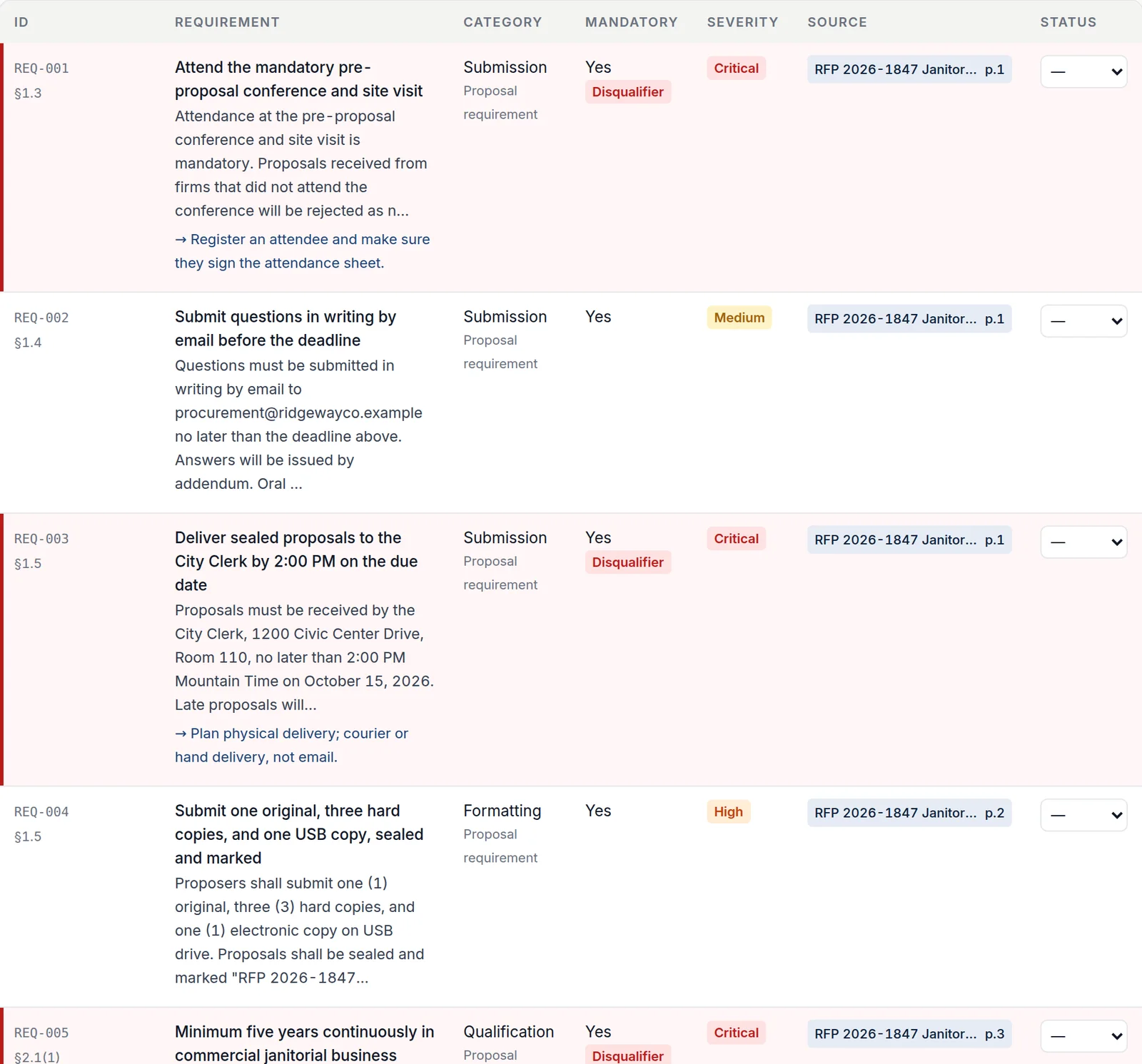
1. Extract every requirement. Go through the main document and every attachment and pull each obligation into a row with its section reference. Requirements hide in the instructions to proposers, the scope of work, the sample contract, the insurance section, the price form's instructions, and every addendum. A 40-page municipal package typically yields 30 to 60 rows; a federal solicitation, hundreds.
2. Separate proposal requirements from performance requirements. "Submit three references" binds the proposal. "Respond to emergencies within two hours" binds the contractor after award. Both go in the matrix, but the first kind determines whether you are responsive and the second determines whether you can deliver. Tag them.
3. Mark the mandatory ones, and the rejection-grade ones. "Proposals that do not include Attachment D will be rejected" is a different row from "proposers should describe their training program." Give the rejection-grade rows a visible mark. They are the first thing you check on submission day.
4. Assign owners and locations. Even in a three-person firm, write a name on each row and decide where in the proposal it is answered. This is how the proposal gets an outline for free.
5. Set a status for every row. Comply, partial, gap, not applicable, or to be decided. Your gap rows are your bid/no-bid decision: a reference you do not have is not a writing problem.
Using it while you write
Write to the matrix, not to the solicitation. Each section of your proposal answers a set of rows; when the rows in a section are all "comply," the section is done. Where the buyer's evaluation criteria and the requirements overlap, order your sections by the criteria and use the matrix to make sure every requirement is answered inside them.
Include a version of the matrix in the proposal if the solicitation allows it, usually as a cross-reference table near the front: requirement, section reference, where answered. Evaluators like being told where to look.
Using it to check the bid
On submission day, filter to mandatory rows and walk them. Every form signed. Every copy counted. Every acknowledgment returned. Price in the right envelope. Attendance sheet from the mandatory meeting in the file. This ten-minute check is what stands between a good proposal and a rejected one; why bids get rejected lists what it catches.
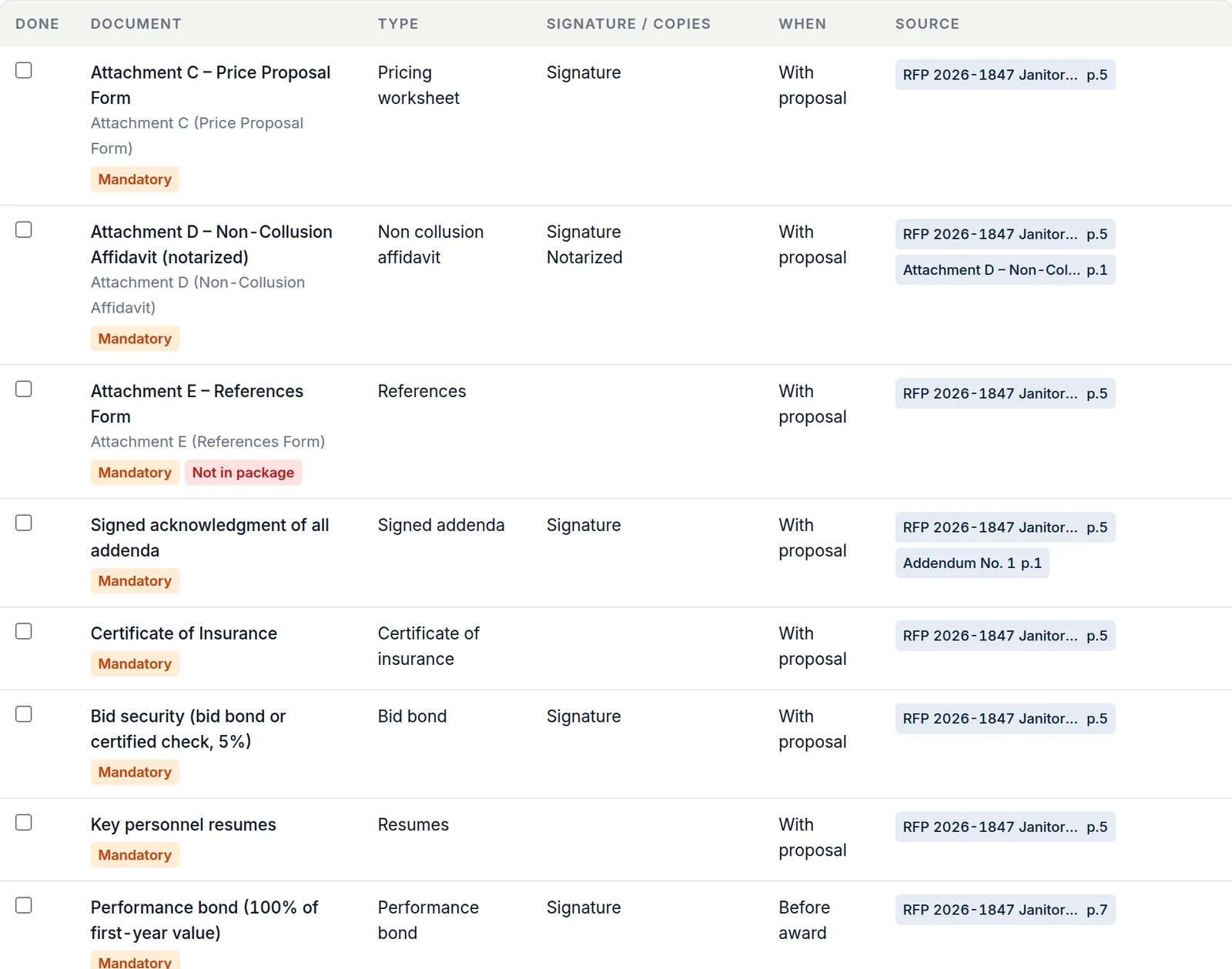
Then filter to the rows an addendum touched and confirm your answers still match. If the addendum changed the insurance limit, your certificate of insurance and your pricing both change with it. What an addendum changes covers this.
Building it in an afternoon instead of a week
Extracting 40 requirements by hand from a package with five attachments takes a working day, and the rows you miss are the ones that were in the sample contract nobody read. This is the part worth automating.
WinMyBids builds the matrix from the uploaded package: every requirement in the buyer's words, its section, whether it is mandatory, its severity, and a link to the page it came from, so you can click any row and see the passage highlighted in the original document. The Excel export adds owner, status, and response-location columns ready to fill, and the CSV loads into whatever you already use. It is part of the Bid Intelligence Report, and the sample report shows a 36-row matrix for a fictional city janitorial RFP.
Questions people ask
What is the difference between a compliance matrix and a requirements matrix? Mostly vocabulary. Federal proposal teams say compliance matrix; some agencies and engineering firms say requirements traceability matrix. Both are one row per requirement with a location and a status.
Do I need one for a small bid? If the package has more than a dozen requirements or more than one attachment, yes. The bids that get rejected for a missing form are almost never the large ones with proposal managers.
Should I send the matrix to the buyer? Only if the solicitation asks for a cross-reference or allows one. Send the columns the evaluator can use (requirement, reference, where answered), never your internal owner and status columns.
How do I keep it current when addenda arrive? Add rows for new requirements, mark superseded ones, and re-check every row the addendum touched. Give the addendum its own section reference so the trail is visible.
Bidding on an RFP right now?
Upload the package and get every deadline, requirement, and form linked to its page, free, before you decide to buy the report.
Analyze an RFP, free preview first